
DNS for Beginners: How the Domain Name System Actually Works
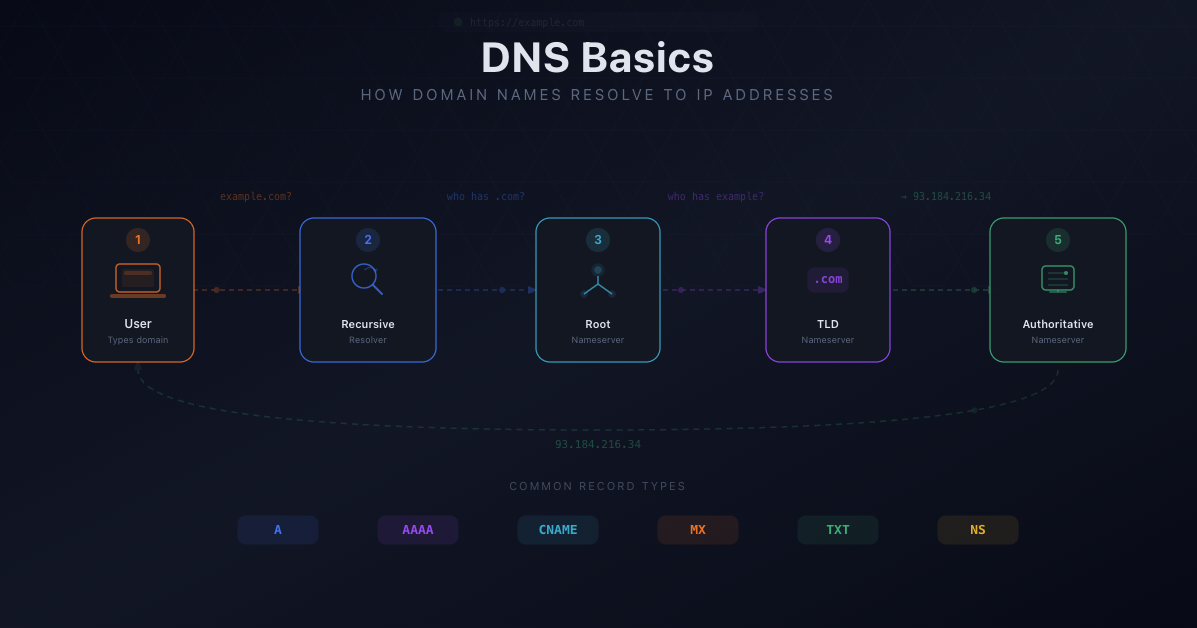
Think of it as a phone book, except it's distributed across thousands of servers worldwide and responds in milliseconds.
The Lookup Process, Step by Step
When you visit zonewatcher.com, here's what actually happens:
1. Your browser checks its cache. If you visited the site recently, the answer might already be stored locally. Done in microseconds.
2. Your operating system checks its cache. Same idea, slightly broader. Your OS remembers recent lookups too.
3. The query goes to a recursive resolver. This is usually your ISP's DNS server, or a public one like Cloudflare (1.1.1.1) or Google (8.8.8.8). The resolver's job is to track down the answer on your behalf.
4. The resolver asks the root servers. There are 13 root server clusters worldwide. They don't know the IP for zonewatcher.com, but they know who's responsible for .com domains. They respond with a referral.
5. The resolver asks the TLD servers. The .com TLD servers know which nameservers are authoritative for zonewatcher.com. Another referral.
6. The resolver asks the authoritative nameserver. This server has the actual DNS records. It responds with the IP address.
7. The resolver returns the answer to your browser. Your browser connects to the IP and loads the page.
This entire chain typically completes in under 100 milliseconds. Most of the time, caching shortcuts it to under 10ms.
The Key Players
Recursive resolvers do the legwork. They chase referrals from server to server until they find the answer, then cache it for next time.
Authoritative nameservers hold the truth. They store the actual DNS records for a domain including A records, MX records, CNAME records, and dozens of other types.
Root servers sit at the top of the hierarchy. They're the starting point when nobody else has the answer cached.
DNS Records: The Building Blocks
DNS isn't just about mapping names to IP addresses. Different record types serve different purposes:
- A records map a domain to an IPv4 address
- AAAA records map a domain to an IPv6 address
- CNAME records create an alias from one domain to another
- MX records tell email servers where to deliver mail
- TXT records store arbitrary text, commonly used for email authentication and domain verification
- NS records delegate a domain to specific nameservers
There are dozens more, each with a specific purpose. Your domain's collection of DNS records is called a zone. The file that stores them is a zone file.
Why DNS Matters Beyond "It Just Works"
Most people never think about DNS until something breaks. But DNS is also a security surface. If someone modifies your DNS records (whether through a compromised registrar account, a social engineering attack, or an insider mistake), they can redirect your traffic, intercept your email, or impersonate your website.
This is why DNS monitoring exists. Changes to your DNS records should be intentional, authorized, and tracked. When they're not, you want to know immediately.
Common DNS Problems
Propagation delays. When you change a DNS record, it doesn't update everywhere instantly. Cached copies of the old record persist until their TTL (time to live) expires, which is normal but catches people off guard.
Misconfigured records. A typo in an A record, a missing MX record, or a CNAME where it shouldn't be can take down a website or break email delivery.
Stale records. Old DNS records pointing to decommissioned servers are a security risk. Attackers can claim those resources and serve content under your domain name.
Provider outages. If your DNS provider goes down, nobody can resolve your domain, even if your web server is perfectly healthy. DNS is a single point of failure that most teams underestimate.
What to Do Next
If you manage domains (even just one), it's worth understanding what's in your DNS zone. Run a lookup on your domain and review the records. Make sure you know what each one does and whether it's still needed.
Better yet, set up DNS monitoring so you're alerted when something changes. DNS problems are almost always easier to fix when you catch them early.