
SPF, DKIM, and DMARC Explained: DNS Records That Protect Your Email
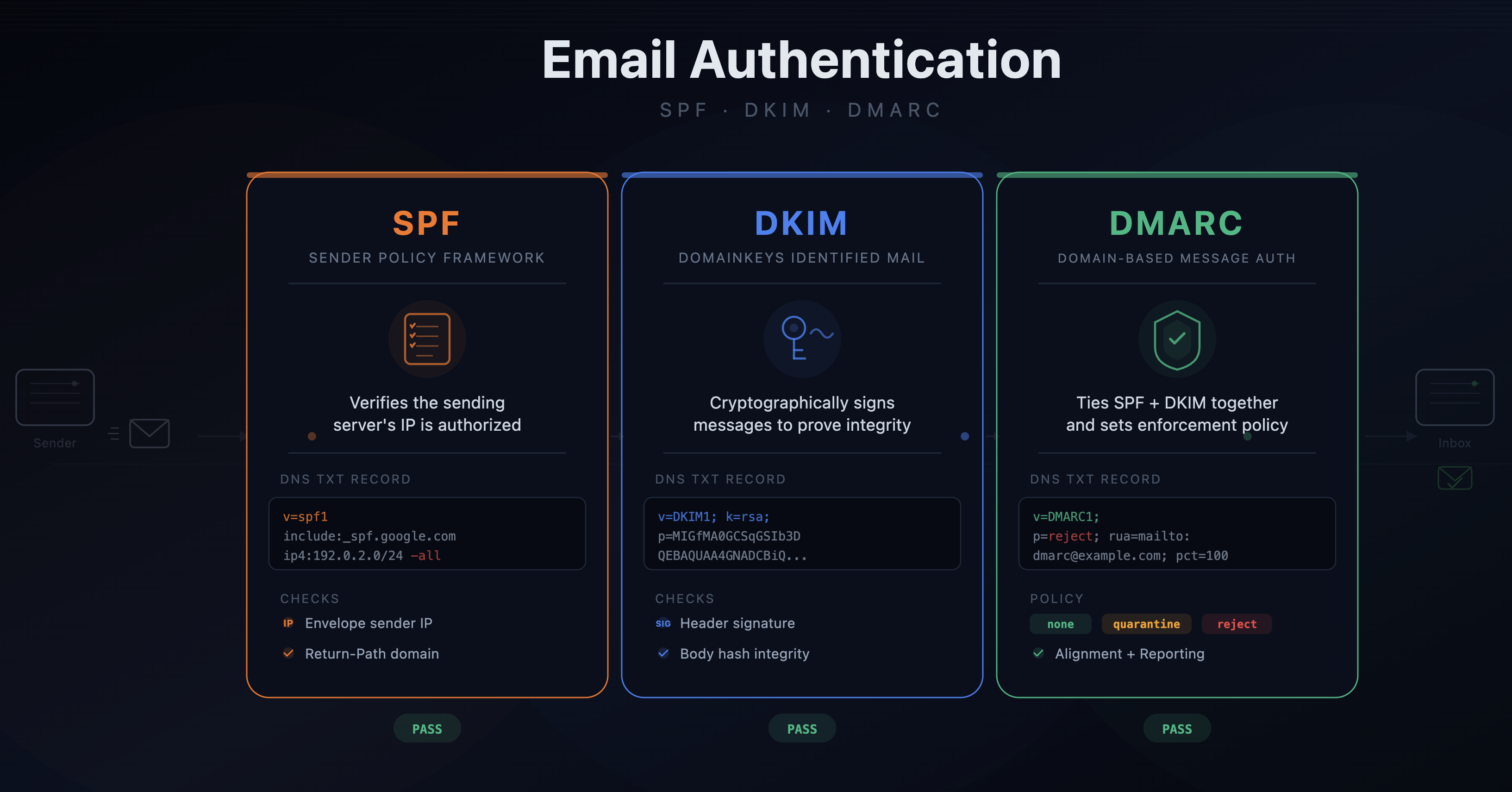
If you manage a domain that sends email, these three records are not optional. Without them, your emails land in spam folders, and attackers can impersonate your organization with almost no effort.
SPF: Who's Allowed to Send
Sender Policy Framework is a TXT record published on your domain that lists the IP addresses and services authorized to send email on your behalf.
A typical SPF record looks like this:
v=spf1 include:_spf.google.com include:sendgrid.net -all
This says: Google Workspace and SendGrid are allowed to send email for this domain. Everything else should be rejected (-all).
When a mail server receives an email from your domain, it checks your SPF record against the sending server's IP. If there's no match, the email fails SPF.
Common mistakes:
- Forgetting to add a new email service (marketing tools, transactional email providers, helpdesk software) to your SPF record. The emails go out fine, but the receiving server sees them as unauthorized.
- Using
~all(softfail) instead of-all(hardfail). Softfail is weaker; it flags unauthorized senders but doesn't outright reject them. - Exceeding the 10-DNS-lookup limit. SPF allows a maximum of 10
includemechanisms. Complex setups with many email providers hit this ceiling and silently break.
DKIM: Proving the Email Wasn't Tampered With
DomainKeys Identified Mail adds a cryptographic signature to every outgoing email. The private key lives with your email provider, and the public key is published as a DNS record.
A DKIM DNS record is a TXT record on a subdomain, typically something like:
google._domainkey.yourdomain.com
The value contains the public key. When a receiving server gets your email, it extracts the signature from the email headers, fetches the public key from DNS, and verifies the signature. If it checks out, the email hasn't been altered in transit and it genuinely originated from a system that holds the private key.
DKIM doesn't prevent spoofing on its own; it just proves that the email was signed by someone with access to the key. It works together with SPF and DMARC.
Common mistakes:
- Not rotating DKIM keys. If a key is compromised, an attacker can sign emails that pass DKIM verification.
- Misconfigured selectors. Each email provider uses its own selector (the
google._domainkeypart). Miss one and that provider's emails fail DKIM.
DMARC: The Policy Layer
Domain-based Message Authentication, Reporting and Conformance ties SPF and DKIM together. It tells receiving servers what to do when authentication fails.
A DMARC record is a TXT record on _dmarc.yourdomain.com:
v=DMARC1; p=reject; rua=mailto:dmarc-reports@yourdomain.com; pct=100
The key part is the policy (p=):
p=none: monitor only; don't take action on failures (good for initial rollout)p=quarantine: send failing emails to spamp=reject: block failing emails entirely
The rua tag specifies where aggregate reports should go. These reports are XML files sent by receiving mail servers. They show you which IPs are sending email as your domain and whether they pass SPF and DKIM.
The rollout path:
Start with p=none and collect reports for a few weeks. Review the reports to identify legitimate services that aren't properly authenticated. Fix their SPF/DKIM records. Then move to p=quarantine, and eventually p=reject.
Jumping straight to p=reject without monitoring first is how you accidentally block your own email.
How They Work Together
The three records form a chain:
- SPF checks whether the sending IP is authorized
- DKIM checks whether the email was signed with a valid key
- DMARC checks whether at least one of SPF or DKIM passes and aligns with the domain in the From header, then enforces the policy
"Alignment" is the piece people miss. An email can pass SPF but fail DMARC if the SPF-authenticated domain doesn't match the From address. Same for DKIM. DMARC requires that the authenticated domain aligns with what the recipient sees.
Why Monitoring These Records Matters
These records are just DNS entries. They can be changed, intentionally or not. A single bad edit can:
- Break email delivery for your entire organization
- Silently weaken your spoofing protection (changing
-allto~all, orp=rejecttop=none) - Remove a sending service, causing transactional emails to bounce
If you're not monitoring your SPF, DKIM, and DMARC records for changes, you won't know something is wrong until users start reporting missing emails, which can take days.
Set up DNS monitoring to alert you the moment any of these records change. An unauthorized modification to your DMARC policy is a security incident, and you want to catch it in minutes, not weeks.